
Security in Azure Cloud: An Attacker's Guide for Defenders
Master security in Azure Cloud with this guide for CISOs. Learn about IAM, network controls, and red-team validation from an attacker's perspective.
Security in Azure Cloud: An Attacker's Guide for Defenders
Master security in Azure Cloud with this guide for CISOs. Learn about IAM, network controls, and red-team validation from an attacker's perspective.
NullCipher Team
6/30/202612 min read
Your Azure team may have passed the audit, closed the tickets, and turned on the right native services. You can still be one stolen token, one inherited role, or one exposed management path away from a serious breach.
That's the problem with security in Azure cloud environments. Most failures don't start with broken encryption or a flaw in Microsoft's platform. They start in the customer-controlled layer. An attacker finds a weak identity, a permissive role assignment, a forgotten workload, or a logging gap, then turns ordinary administration features into an attack path.
Executives feel this pressure already. Cloud incidents are no longer edge cases. They're operational risk, board risk, and business continuity risk. The right question isn't whether your Azure estate looks compliant. It's whether an attacker can operate inside it without much resistance.
Beyond the Audit Your Azure Security Blind Spots
A familiar scenario plays out in mature organizations. The CISO gets a clean report. Multifactor authentication exists on paper. Defender is licensed. Policies are documented. The board hears that Azure is locked down.
Then an attacker logs in through a low-value account with too much reach and starts enumerating subscriptions, storage, apps, and secrets.
That gap matters because cloud risk has become routine. 45% of all global data breaches now occur in cloud environments, and 61% of organizations reported a major cloud incident in 2024, up from 24% in 2023, according to Exabeam's cloud security statistics roundup. A compliant Azure environment can still be an exploitable Azure environment.
What audits usually miss
Audits tend to reward control presence. Attackers care about control effectiveness.
A checklist may confirm that you use role-based access control, but it won't prove that inherited permissions don't create privilege escalation paths. It may confirm that logs exist, but not that analysts can spot suspicious use of Azure Resource Manager operations fast enough to stop impact. It may confirm that a vault is encrypted, while ignoring who can change vault policy or retrieve secrets.
Compliance reduces audit friction. It doesn't prove an attacker can't move.
A red team sees the blind spots differently. They look for stale service principals, overbroad Contributor rights, unmanaged workloads, exceptions added for convenience, and administrative paths that bypass the intended approval process.
The practical executive question
Instead of asking, “Did we enable the control?” ask:
Can it be bypassed: Can a user, workload identity, or admin tool reach the same resource another way?
Can it be abused: Does a legitimate Azure feature provide an attacker with an advantage if the wrong account gets compromised?
Can we detect it: If someone changes access, lists keys, or opens a management path, will the SOC investigate in time?
That's where effective security in Azure cloud programs separate from paper security. They assume a control will be tested by an adversary, not admired by an auditor.
Redefining the Shared Responsibility Model
The standard shared responsibility diagram makes people too comfortable. It implies a neat split: Microsoft secures the platform, you secure what you build on it. That's true, but it's incomplete.
Attackers don't spend much time fighting the foundation. They hunt in the customer layer.
Where attackers actually focus
Think of Azure as a secure building. Microsoft controls the structure, base infrastructure, and many embedded protections. You control the keys, room access, internal cameras, storage cages, and service corridors.
The attacker wants your keys.
That means the practical battleground is your side of the model:
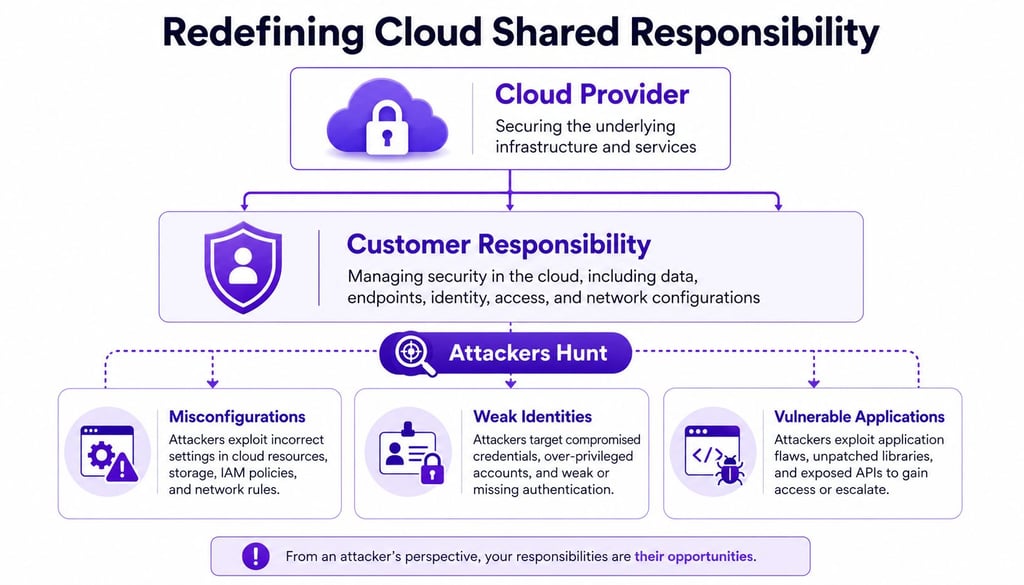
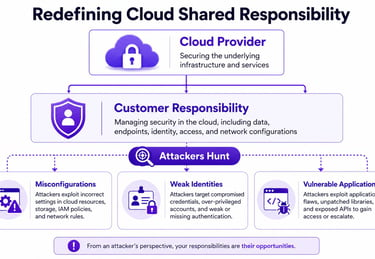
Microsoft's own posture guidance reinforces the point. Native features only help when teams configure and enforce them correctly. That's why shared responsibility should be read as shared infrastructure, customer attack surface.
What the model should change in leadership behavior
Leaders often treat the model as a governance diagram. Defenders should treat it as a targeting map.
If you want a useful cross-cloud comparison, this same dynamic appears in a CISO action plan for AWS cloud security. The platform differs. The attacker logic doesn't. Adversaries target the part customers configure, delegate, and forget.
The most dangerous sentence in cloud security is “Microsoft handles that,” when the risky setting lives in your tenant.
That changes how you fund and review Azure security. Spend less time assuming that buying a capability means risk is reduced. Spend more time validating whether identities, networks, apps, and logs behave the way the architecture diagram claims they do.
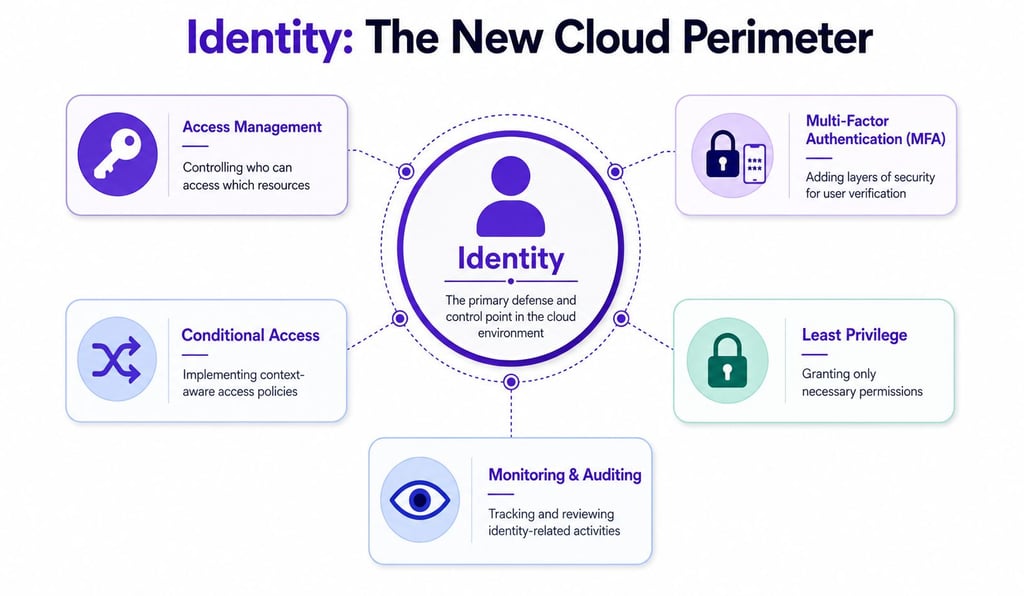
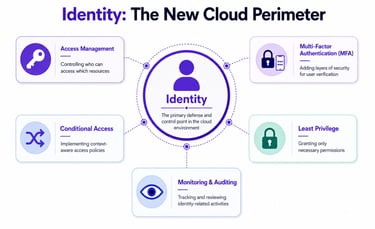
Identity Is Your True Cloud Perimeter
At 2:00 a.m., the alert does not say "firewall bypass." It says a valid user signed in, queried Azure resources, pulled role assignments, and touched a key vault that account never should have reached. That is how many Azure breaches start. The attacker does not break the perimeter first. They log in through it.
In Azure, identity decides what an attacker can enumerate, change, and persist on. A stolen laptop has limited value if the account on it is tightly scoped. A stolen token, session cookie, service principal secret, or overprivileged user account can open the management plane, data plane, and administrative workflow at the same time. Strong sign-in controls matter, but they do not fix excessive authorization after the attacker is in.
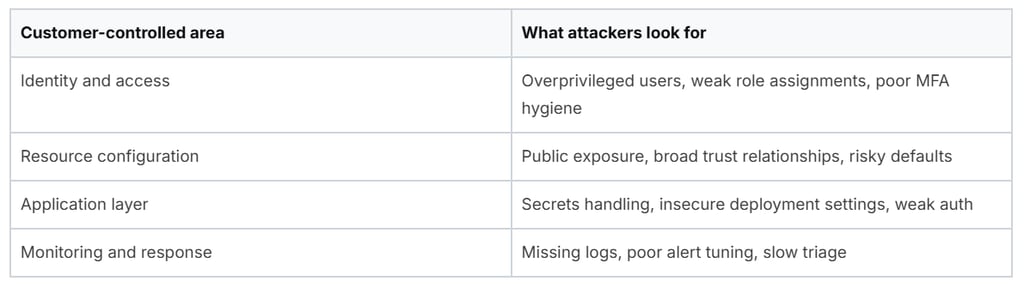
How attackers chain weak permissions
Real-world Azure escalation rarely starts with Global Administrator. It starts with an account that looked harmless during review and dangerous only after someone mapped what it could reach.
Common starting points include:
A helpdesk or engineering account with broad read rights: Attackers inventory subscriptions, app registrations, storage accounts, automation, and role assignments to identify the next pivot.
A service principal with excessive permissions: They use it to access deployment pipelines, enumerate managed identities, or pull secrets that expand control.
A privileged account used for daily work: Phishing, token theft, or browser session hijacking gives the attacker cloud access with almost no noise.
A common chain looks like this:
The attacker gets a low-friction identity through phishing, token theft, password spray, or exposed credentials.
They enumerate effective permissions and inherited roles across the tenant.
They find a secret, consent path, automation asset, or mis-scoped identity that expands access.
They move into storage, app services, pipelines, key vaults, or admin workflows.
They establish persistence before responders understand what the first account exposed.
This is why least privilege has to be measurable. If a compromised identity can still read sensitive resources, assign roles, approve app consent, or pull secrets from automation, the policy exists on paper and nowhere else.
A short explainer on identity-centric defense helps frame the issue:
A board-level summary should separate these two ideas. Compliance lowers audit exposure. Validation lowers breach exposure. Mature security in Azure cloud programs need both, but they should never confuse one for the other.
Validating Defenses with an Offensive Approach
Azure security fails in the places defenders assume nobody will test. Offensive validation fixes that.
The most valuable cloud assessments don't just enumerate findings. They try to reproduce attacker logic against your identities, role assignments, admin workflows, CI/CD paths, exposed services, and detection stack. That's how you find the gap between declared policy and actual control behavior.
What works in practice
The controls that hold up under red-team pressure are usually restrictive, inconvenient, and worth the friction. Microsoft documents MFA, Conditional Access, privileged identity controls, and workload identity governance across Microsoft Entra identity security best practices. The point is not to collect features. The point is to break the attack chain early and reduce what a single compromised identity can do.
Use controls that force the attacker to work harder:
Separate privileged identities: Keep admin accounts cloud-only, require MFA, and never use them for email or browsing, as recommended in CrowdStrike's Azure security practices.
Constrain session context: Use Conditional Access to limit where privileged access can occur, what device state is required, and which risky sign-ins get blocked or stepped up.
Reduce standing access: Use Just-in-Time and Just-Enough-Access models so admin rights are granted for a task, not left available all week.
Review non-human identities: Service principals, managed identities, and automation accounts often keep permissions long after the project that created them is gone.
Test blast radius with adversary simulation: Validate whether a compromised user can enumerate subscriptions, read key vault metadata, abuse app consent, or pivot through automation. That is the kind of work Azure security assessment and offensive validation services should confirm before an attacker does.
When an identity can reach everything, the attacker does not need malware. They need patience.
Defenders who treat identity as the primary attack surface catch more than policy drift. They find the specific paths an operator would use after the first foothold, then close them before a routine compromise turns into tenant-wide control.
Containing the Breach with Network and Data Controls
Assume an attacker already has an identity. The next question is simple: what can they touch now?
Network design and data control stop being architecture topics and become containment tools. Good containment doesn't rely on preventing every intrusion. It limits what a compromised identity or workload can reach after the first failure.
Contain movement, not just ingress
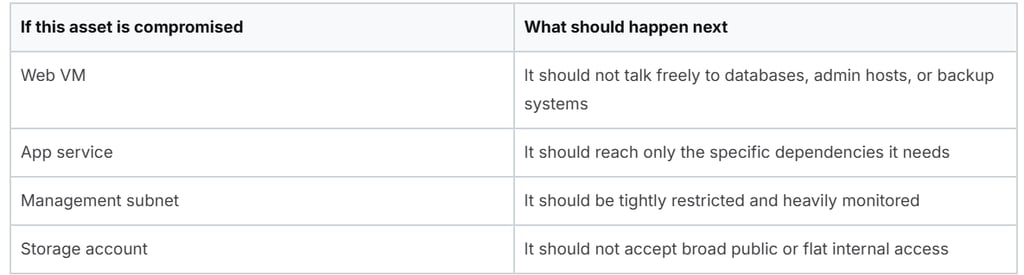
Many Azure environments still focus heavily on north-south controls and too lightly on east-west movement. That's a mistake. Once an attacker lands on a virtual machine, app service, or management plane session, they look for neighboring systems with weak segmentation.
Micro-segmentation in Azure means using tools like Network Security Groups, Azure Firewall, and Application Security Groups to create deliberate trust boundaries between workloads.
A useful executive test is this one:
The point isn't complexity. The point is forcing the attacker to generate more signals and cross more controls.
Protect the keys from the identity
Data protection fails when teams secure the vault but overtrust the identity that can open it.
For Azure Key Vault, strong practice is straightforward. Rotate customer-managed keys every 90 days, manually enable purge protection, and enforce least-privilege access via Azure RBAC, as outlined in Wiz guidance on Azure Key Vault security.
That matters because compromised identities often target the management layer around secrets, not the cryptography itself.
Use this sequence:
Limit retrieval rights: Very few identities should read secrets or manage keys.
Separate administration from usage: The team that manages the vault shouldn't automatically consume everything inside it.
Turn on purge protection: If an attacker gets deletion rights, recovery options matter.
Rotate on policy: Don't wait for suspicion. Build rotation into operations.
For organizations that need external validation of cloud containment and identity exposure, Valiant Cyber Solutions security services are one option alongside internal assessments and platform-native reviews.
A vault with weak RBAC is just a well-labeled target.
Network and data controls work best together. Segmentation slows the attacker. Tight secret management denies the shortcuts they usually want.
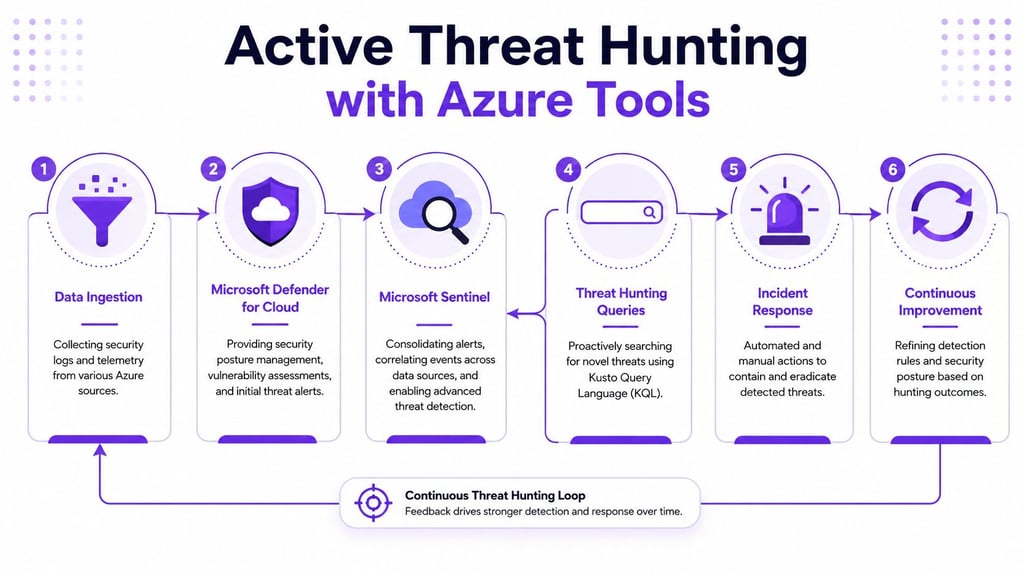
Active Threat Hunting with Defender and Sentinel
A tenant gets popped at 2:13 a.m. The first sign is not malware. It is an ordinary Azure action that should have looked boring: a role assignment change, a new sign-in pattern, a burst of Key Vault reads, then process execution on a VM. By the time the alert queue catches up, the attacker is already using valid access.
That is why Defender for Cloud and Sentinel matter most after deployment, during active hunting. Teams that treat them as alert sinks miss the full value. An attacker in Azure usually lives off approved features, management APIs, and trusted identities. Hunting has to focus on how those pieces get abused in sequence.
Turn telemetry into hunting data
Collecting logs is easy. Collecting the right logs and asking useful questions is harder.
Start with telemetry that exposes attacker movement across Entra ID, Azure Activity Logs, Key Vault, storage, Defender signals, workload logs, and endpoint events. Defender for Cloud gives security context around exposed resources and suspicious activity. Sentinel lets analysts correlate those signals and test hypotheses with KQL.
The key question is simple: what would an intruder do next with the access they already have?
Good hunts are built around that question:
Which identities gained privilege, activated PIM roles, or received new app permissions
Which resources had control-plane changes that weaken security, such as NSG edits, diagnostic settings removal, or Defender configuration changes
Which admin actions came from a new IP range, unfamiliar device, impossible travel pattern, or unusual automation account
Which workload events line up with attacker behavior, such as password spraying, command execution, token abuse, or abnormal secret retrieval
Hunt for behavior, not product alerts
The weak approach is to wait for a high-severity incident and call that hunting. Real hunting starts earlier, before the alert engine has enough confidence to promote the activity.
In Azure, attackers often avoid noisy malware and use built-in actions that look legitimate on their own. A single VM extension deployment might be routine. A service principal reading one secret might be expected. Pair those events with a fresh role assignment, an unusual login source, and failed sign-in activity against the same tenant, and the pattern changes fast.
Build hunts around attacker tradecraft:
RDP and SSH pressure on exposed systems: Look for repeated authentication failures followed by successful access, then privilege use or lateral management actions.
Privilege escalation: Watch for role assignments, PIM activations, consent grants, managed identity abuse, and changes to conditional access exclusions.
Secret access bursts: Hunt for identities that suddenly query Key Vault, storage, or app configuration stores at unusual times or volumes.
Control-plane tampering: Track deletion or weakening of diagnostic settings, policy assignments, Defender plans, or logging pipelines.
Living off the cloud: Focus on valid Azure operations used in suspicious order, especially actions that create persistence or reduce visibility.
I usually tell blue teams to stop asking, "Did Sentinel fire?" and ask, "Would this sequence survive analyst review if a red team used it?" That framing changes query design.
A practical hunting cadence works better than dashboard watching:
Pick one tactic, such as credential access, persistence, or lateral movement.
List the Azure-native actions an attacker would use to achieve it.
Write Sentinel queries that connect identity, control-plane, and workload evidence.
Validate the hunt during purple-team or red-team activity.
Tune out the noise without removing the behaviors that matter.
If your SOC only works the incidents Microsoft labels for you, an attacker only needs to stay slightly outside those labels.
Map detections to MITRE ATT&CK, but do it for coverage analysis, not decoration. The useful outcome is finding blind spots. If your team cannot explain how it would detect cloud privilege escalation, persistence through automation, secret abuse, or tampering with logging in Azure, the hunting program is still immature.
The best test is adversarial validation. Run controlled exercises that use real Azure attack paths, then verify whether Defender and Sentinel captured the setup, the pivot, and the objective. That is how you find the gap between "logging enabled" and "attack detected."
Moving from Compliance to Combat Readiness
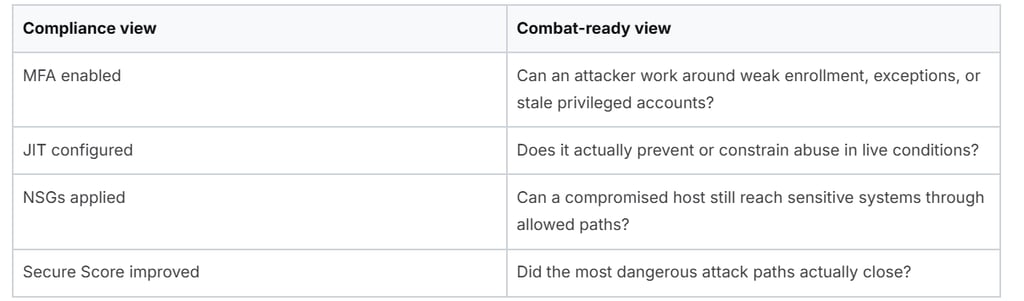
Frameworks matter. They standardize expectations, force accountability, and make posture measurable. They just don't prove survivability.
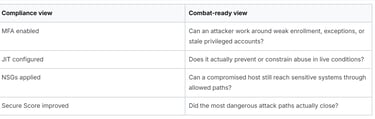
That distinction matters in Azure because teams often stop at the benchmark. They improve policy coverage, raise Secure Score, and assume the environment got safer. Sometimes it did. Sometimes the same exploitable path still works because no one tested it under pressure.
Why Secure Score can mislead
The Microsoft Cloud Security Benchmark defines over 420 policies to measure posture, and Microsoft ties many of those controls to Secure Score improvement. More important, the benchmark overview states that enforcing controls like NSGs and Just-in-Time access has been shown to reduce lateral movement risk by 60% and mitigate brute-force vectors by 95%.
Those are useful outcomes. But Secure Score is still a proxy.
A score can rise while dangerous realities remain:
A privileged workflow still grants broad access during emergencies
An exception bypasses the intended segmentation
A service principal still exposes a critical subscription
A logging source exists but analysts don't investigate it
What combat readiness looks like
Combat readiness starts when you ask whether controls resist abuse, not whether they exist.
Use posture frameworks for baseline discipline. Then validate the assumptions behind them:


A major blind spot sits in identity governance. 68% of Azure identity breaches stemmed from misconfigured PIM and JIT access, yet public threat models document relatively few tactics for exploiting them, according to the Cloud Security Alliance discussion of Azure security gaps. That's exactly why hands-on red team testing matters.
Know what type of test you are buying
These terms get mixed together too often:
Vulnerability scan: Broad coverage, low context. Useful for hygiene. Poor at proving exploitability in Azure identity paths.
Penetration test: Controlled exploitation against a defined scope. Good for validating whether specific cloud weaknesses can be abused.
Red team engagement: Adversary simulation across people, process, identity, cloud, and detection. Best for testing whether defenders detect and contain a realistic attack chain.
If your concern is Azure exposure, ask for testing that covers things like:
Misconfigured PIM and JIT controls
Service principal abuse
Privilege escalation through RBAC inheritance
Key Vault and secret access paths
CI/CD token theft scenarios and pipeline trust boundaries
Detection quality in Defender and Sentinel during the exercise
Questions leaders should ask
A security vendor should be able to answer direct questions without hiding behind tooling.
Ask:
How do you validate Azure IAM, not just review it?
Will you test whether JIT and privileged access controls can be bypassed or abused?
Can you simulate realistic cloud attack paths across identities, workloads, and control plane actions?
Will you show proof-of-concept impact and map it to remediation?
Do you retest after fixes?
For teams seeking that kind of validation, Azure-focused penetration testing and vulnerability assessment services can provide one approach to proving whether controls hold up under attack.
Null Cipher Security helps organizations validate real-world cloud risk through adversary-simulated testing, executive security advisory, and remediation verification. If your Azure environment looks compliant but you're not sure it's defensible, review Null Cipher Security for offensive testing, cloud security assessment, and executive-level guidance.