

Remote Access Security: An Attacker's Guide to Defense
Fortify your remote access security against modern threats. Learn attacker-minded strategies for VPNs, ZTNA, PAM, and MFA to protect your critical assets.
Remote Access Security: An Attacker's Guide to Defense
Fortify your remote access security against modern threats. Learn attacker-minded strategies for VPNs, ZTNA, PAM, and MFA to protect your critical assets.
Null Cipher Security
7/4/202611 min read
In 2025, edge and VPN devices represented 22% of all initial access exploit paths for data breaches, an approximately 8-fold increase from the previous year according to NordLayer's 2025 cybersecurity statistics summary. That single number changes how security leaders should think about remote access security.
Attackers no longer need to break through a hardened headquarters network. They target the edge. They phish a remote employee, exploit an exposed VPN appliance, abuse weak MFA flows, or ride in through a contractor connection that nobody reviewed closely enough. The perimeter didn't just expand. It dissolved.
A defensible remote access strategy starts with an attacker's question. If I wanted to get in fast, unnoticed, and with the least resistance, which remote path would I pick? Most organizations already know the answer. It's the connection that was built for convenience, inherited from legacy architecture, and granted too much trust once a user authenticated.
The New Perimeter is No Perimeter
The old castle-and-moat model assumed users, devices, and systems lived inside a controlled environment. Remote work broke that assumption. Users now connect from home routers, personal devices, shared spaces, and third-party networks that security teams don't own and can't fully trust.
That matters because attackers have adjusted faster than many defenders. They don't always start with a flashy exploit. They look for the side door. In remote access security, that side door is often a legacy VPN portal, a weak administrative workflow, or a remote management path that still grants broad internal reach after a single successful login.
Why the edge became the primary target
The sharp rise in attacks against edge and VPN devices tells you where adversaries see return on effort. These systems sit at the boundary between the public internet and internal resources. They're exposed, business-critical, and often hard to patch quickly because nobody wants to break remote productivity.
Attackers know this. If they compromise a remote access gateway, they don't just gain a foothold. They often gain trusted network placement.
Practical rule: Treat every remote connection as hostile until identity, device state, and requested resource access are verified in context.
A modern strategy starts with three assumptions:
Credentials will be stolen. Phishing, password reuse, and session theft still work.
External infrastructure will be probed constantly. Internet-facing access points attract both opportunistic scanning and targeted exploitation.
Trusted users can still create risk. Mistakes, unmanaged devices, and third-party access all widen exposure.
Remote access security has to reflect those realities. That means reducing implicit trust, limiting access scope, shrinking exposure windows, and instrumenting the access path so defenders can see what attackers are doing before they move deeper.
Understanding the Modern Threat Landscape
Attackers don't think in terms of policies. They think in terms of reachable systems, weak controls, and exposed workflows. Remote access is attractive because it compresses the path to impact. A stolen password can become a VPN session. A misconfigured gateway can become internal discovery. A contractor account can become privileged access if nobody scoped it properly.
Remote workers are 3 times more likely to accidentally expose data compared to office-based employees, and by October 2025, 63% of businesses reported data breaches directly attributable to remote work practices, while home network routers accounted for over 50% of the most exploitable devices according to Insider Risk's 2025 remote work research.
What attackers hit first
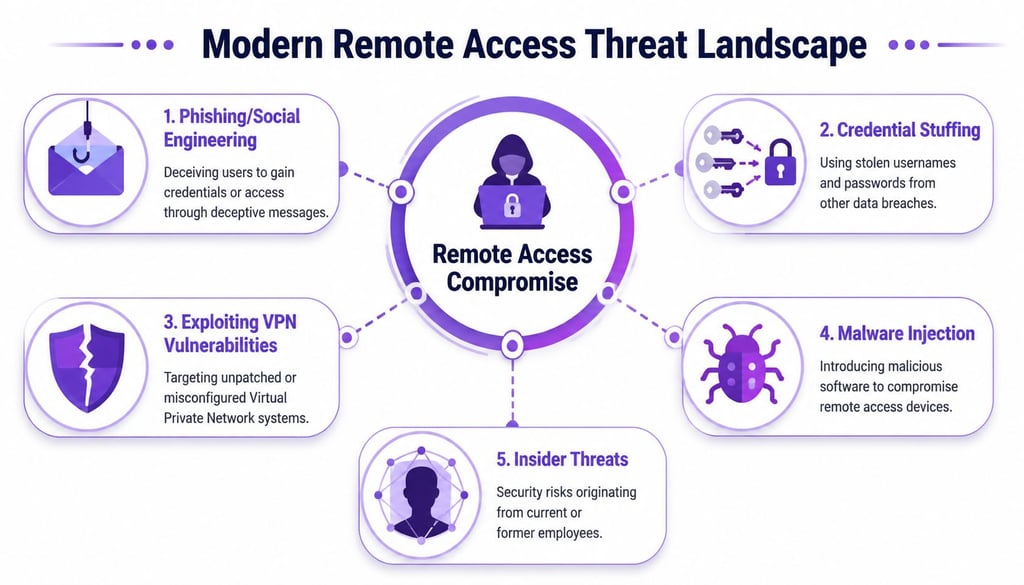
The most common remote access attack paths usually fall into five buckets:
Credential abuse: Attackers test reused usernames and passwords against VPNs, SSO portals, and webmail. If MFA is weak, this becomes an entry point.
VPN and edge exploitation: Unpatched appliances and weak configurations give attackers a direct route into trusted infrastructure.
Phishing and pretexting: A well-crafted lure can capture credentials, MFA prompts, or remote support approval. Executive-targeted campaigns are especially effective, and spear phishing vs. whaling attacks often differ more in targeting and business impact than in delivery mechanics.
Malware on remote endpoints: If a laptop is already compromised, the remote access channel becomes a bridge into internal systems.
Insider misuse: Current staff, former employees, and third-party users can abuse permissions that were never narrowed or removed.
The VPN problem is easiest to understand with a physical analogy. An exposed VPN with broad network access is a vulnerable side door into the building. Security teams may focus on the front lobby, but attackers will take the side door every time.
The home office problem
Home environments introduce variables defenders don't control. Consumer routers lag on updates. Personal devices mix work with unmanaged apps and data. Family or shared usage can blur boundaries around credentials and session security.
That creates two attacker advantages. First, the endpoint is often softer than the corporate network. Second, activity from a real remote user can blend into normal operations.
Attackers love remote access because legitimate use gives them cover. Good detections have to separate normal remote work from abnormal remote behavior.
From an offensive perspective, that means defenders should map remote access threats to behaviors, not just technologies. Look at identity attacks, endpoint compromise, access overreach, and lateral movement as one continuous chain. That mindset is what turns remote access security from a checklist into a workable defense model.
Choosing Your Access Architecture Model
Most organizations carry a mix of old and new access patterns. A VPN still supports broad employee connectivity. A cloud identity layer handles application login. Administrators use RDP or SSH through whatever path evolved over time. Vendors often get exceptions. The result is usually complexity without clear trust boundaries.
The architecture choice matters because it determines what a stolen session can reach.
Why legacy VPN design keeps failing
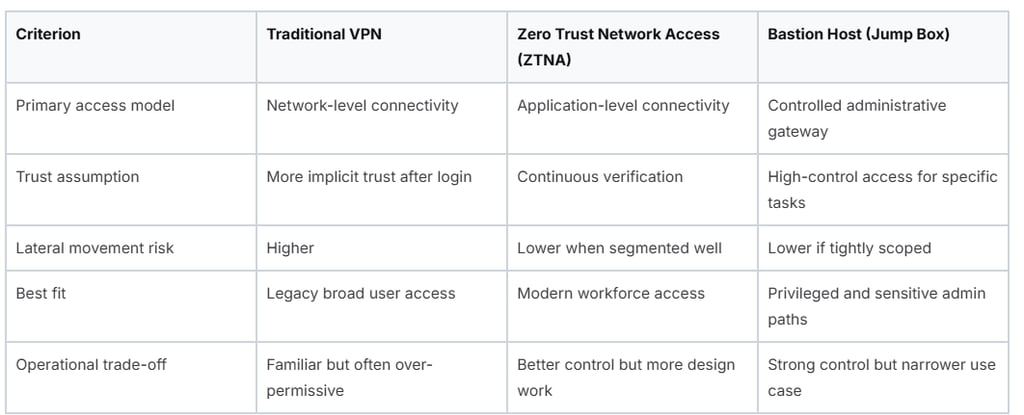
Traditional VPNs still solve one problem well. They connect remote users to internal networks quickly. The problem is what happens after connection. Many VPN deployments still grant broad network-level reach once the user gets through authentication.
NordLayer's remote access guidance describes the core issue directly. Traditional VPNs create a “major liability” because they grant excessive “all or nothing” access, while ZTNA is now the foundation of modern remote security in that same remote access security analysis.
That “all or nothing” model is exactly what attackers want. Once inside, they enumerate shares, probe internal services, target old management interfaces, and hunt for privilege escalation opportunities. If remote access lands a user on the flat internal network, lateral movement gets much easier.
Where ZTNA fits
Zero Trust Network Access changes the access decision. Instead of admitting a user to the network and trusting them afterward, ZTNA brokers access to a specific application or service based on identity, device state, and policy. That doesn't make it magic. It does reduce the blast radius when a session is abused.
For CISOs, the practical upside is straightforward:
Application-level access beats network-level access. A user reaches what they need, not everything adjacent to it.
Policy becomes more precise. You can scope access by role, device health, and sensitivity.
Containment improves. A compromised remote user has less room to explore.
ZTNA works best when paired with segmentation and strong identity. If you're also reviewing cloud IAM and hybrid access paths, this kind of architecture shift should align with a broader AWS cloud security action plan for CISOs, not sit as an isolated remote access project.
When a bastion host is the right answer
A bastion host, or jump box, is still the right answer for some cases. It's especially useful for privileged administration, production support, database operations, and sensitive environments where direct access must be tightly mediated.
The key is to use bastions surgically. They're not a replacement for enterprise-wide user access. They're a choke point for high-risk protocols and privileged workflows.
Decision test: If a compromised remote user can still see large parts of your internal network, the architecture is doing too much trusting and too little enforcing.
A lot of teams don't need to rip out every VPN immediately. They do need to stop treating VPN as the default answer for every user, every device, and every workflow.
Implementing Critical Technical Controls
Architecture sets the direction. Controls enforce it. At this juncture, many remote access security programs either become resilient or collapse under exceptions.
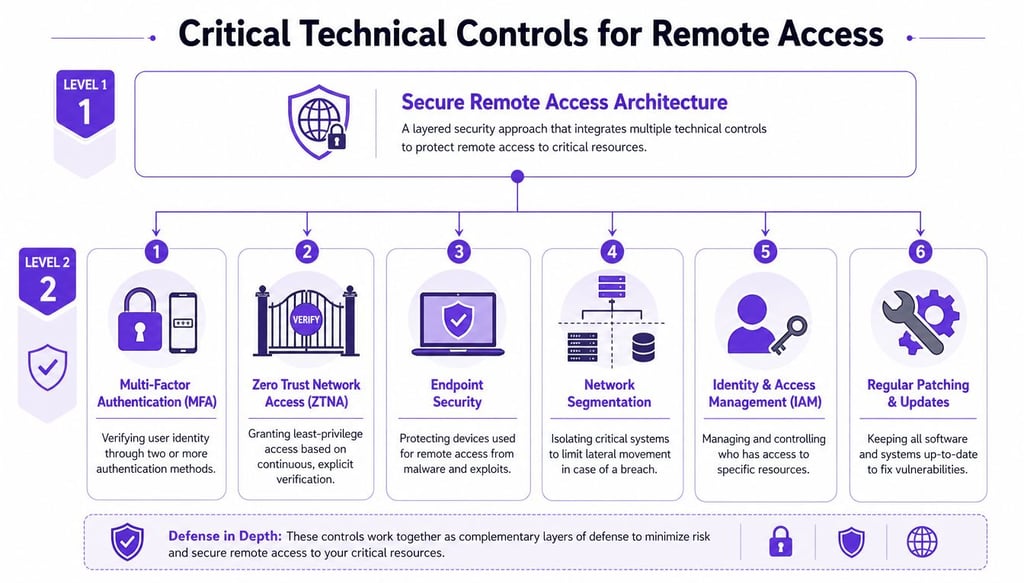
Start with identity because attackers do. Strong identity controls break a large share of common intrusion paths before the attacker gets useful access.
Start with identity hardening
Organizations must enforce MFA on all remote access portals because 99.9% of Microsoft customer accounts are compromised only when MFA is absent, making it the single most effective control against credential theft according to Venn's secure remote access best practices.
That doesn't mean any MFA is good enough. SMS and voice fallbacks create avoidable weakness. Better deployments use TOTP or hardware security keys. Stronger ones move high-risk roles to phishing-resistant methods, especially administrators, help desk staff, executives, and anyone with access to identity systems.
Practical identity controls that work:
Remove weak recovery paths: Attackers often target account recovery and fallback channels instead of the primary login flow.
Require device-aware authentication: If the user is valid but the device is unmanaged or unhealthy, access should stop there.
Separate admin identities: Don't let administrators browse email and manage production systems with the same account.
A useful visual summary of these layers sits below.


Cut privilege to the minimum
Least privilege is where many programs say the right thing and then fail operationally. Remote access users often accumulate access over time. Project work ends, but entitlements remain. Vendors keep standing access because it feels easier than issuing temporary approvals.
That's backwards. Privilege should be short-lived, task-specific, and reviewable.
Use role-based access controls: Tie access to current duties, not historical convenience.
Issue just-in-time elevation: Grant administrative access only for the approved task, then let it expire automatically.
Review access on a schedule: Focus on privileged groups, third-party users, and accounts tied to critical systems first.
Harden high-risk remote protocols
Some controls are essential because attackers target them constantly. RDP is the classic example. If you expose RDP directly, you're making discovery and targeting easier than it should be.
Netwrix's guidance is practical. Restrict direct RDP access from external networks, require a VPN connection first, enable Network Level Authentication, and block external RDP traffic at the firewall in line with its remote access security best practices for RDP hardening. That same guidance notes this attack vector affected over 30,000 corporate networks in 2024.
Don't ask whether remote administration is necessary. Ask whether the current path to remote administration is tightly controlled, segmented, monitored, and temporary.
For privileged remote access, a durable baseline usually includes:
Identity assurance first. MFA, separate admin accounts, conditional access.
Brokered access second. ZTNA, PAM, or a bastion for sensitive protocols like RDP, SSH, and WinRM.
Endpoint checks third. Block devices missing EDR, encryption, or required patch levels.
Segmentation throughout. If a session is compromised, the attacker shouldn't pivot freely to crown-jewel systems.
The hard part isn't naming these controls. It's removing exceptions that nullify them.
Detection and Monitoring for Remote Threats
Prevention won't hold forever. A remote access program becomes defensible when defenders can tell the difference between normal remote work and attacker-operated remote sessions.
That requires visibility across the full control plane, not just endpoint alerts. Many teams collect logs but still miss attacks because the telemetry lives in separate tools and nobody correlates the sequence.
Log the control plane
Start with the systems that make remote access possible:
Identity providers: Successful logins, MFA challenges, policy failures, risky sign-ins, role changes.
VPN concentrators and ZTNA gateways: Session starts, source geolocation, device posture outcomes, denied application requests.
Endpoint agents: Malware detections, process launches tied to remote tools, device compliance state.
Privileged access systems and bastions: Elevation events, session recordings, command execution, approval trails.
Centralize these feeds in your SIEM so analysts can reconstruct a full path. A single failed login doesn't mean much. A login from a new device, followed by impossible travel, followed by privilege elevation, followed by unusual internal access is a very different story.
Alert on attacker behavior, not just failures
The best detections for remote access security focus on patterns:
Impossible travel or location anomalies
Concurrent logins from inconsistent regions or device types
New device enrollment followed by sensitive access
Access outside the user's normal time or application pattern
Repeated MFA prompts or approval fatigue indicators
Privilege escalation shortly after remote authentication
Large changes in resource access scope during one session
Good analysts also look for silent misuse. Attackers who steal valid sessions often avoid noisy brute force behavior. They log in successfully, move carefully, and use built-in administrative tools. That's why sequence-based detection matters more than counting failed passwords.
A clean login isn't proof of legitimacy. It's only proof that one control was satisfied.
If your team can't trace a remote session from identity event to endpoint activity to privileged action, you don't yet have enough visibility to catch a capable adversary early.
Validating Your Defenses Through Proactive Testing
Most remote access weaknesses don't appear in policy documents. They appear when someone tests the path end to end and asks a simple question. If an attacker starts with a remote user or exposed access point, what can they do next?
That's why risk assessments and offensive testing matter. Coalition advises organizations to conduct risk assessments at least once a quarter, and states that organizations that skip quarterly assessments face a 4x higher likelihood of successful breaches due to unpatched misconfigurations in cloud environments, as outlined in its remote access best practices guidance for small businesses.
Penetration testing finds technical openings

A focused penetration test answers targeted questions. Can testers bypass MFA enrollment controls? Is the VPN appliance missing a patch? Can a contractor account reach systems outside its intended scope? Can an exposed bastion be abused to pivot?
This kind of testing is best when you need evidence on specific control failures. It's also the fastest way to validate technical assumptions around remote gateways, identity integrations, firewall rules, and privileged workflows.
Teams evaluating options often benefit from understanding how a penetration test differs from a vulnerability assessment in practical security validation, especially when remote access risk spans identity, infrastructure, and human behavior.
Red teaming tests whether your program holds up
Red teaming asks a broader question. If an adversary gains an initial remote foothold, can your people, processes, and technology detect and contain the intrusion before material damage occurs?
That means the exercise doesn't stop at initial access. It examines internal movement, privilege abuse, persistence attempts, and security team response. It also exposes weak assumptions that compliance checks miss, such as stale vendor access, poor alert triage, or an incident process that depends on tools nobody actively watches.
A practical testing program usually combines both methods:
Use penetration tests to find exploitable openings in remote access technology and policy.
Use red team exercises to validate whether your security program can withstand realistic attacker tradecraft.
Retest after remediation to confirm fixes actually reduced exposure, not just closed a ticket.
Remote access security improves fastest when testing informs engineering changes, identity redesign, monitoring rules, and executive decisions in one cycle.
Your Prioritized Remediation Roadmap
CISOs don't need a longer list of best practices. They need an order of operations that cuts risk quickly and creates momentum.
Start with the controls that break the most common attacker paths, then tighten architecture and validation around them. The goal is to reduce trust, reduce privilege, and reduce attacker dwell time whenever remote access is involved.
Immediate actions that move risk first
Enforce strong MFA everywhere remote access exists. Cover VPNs, admin portals, cloud consoles, and third-party access points. Prefer phishing-resistant methods where possible.
Remove broad standing access. Apply role-based access controls and just-in-time privileges that expire automatically. Seraphic Security notes that this approach can reduce the risk horizon where hackers exploit over-privileged accounts by 70% in cloud environments in its guidance on secure remote access in 2025.
Shut down direct exposure of administrative protocols. Move RDP, SSH, and similar access behind controlled paths such as ZTNA, PAM, or bastions.
Strategic moves that harden the model
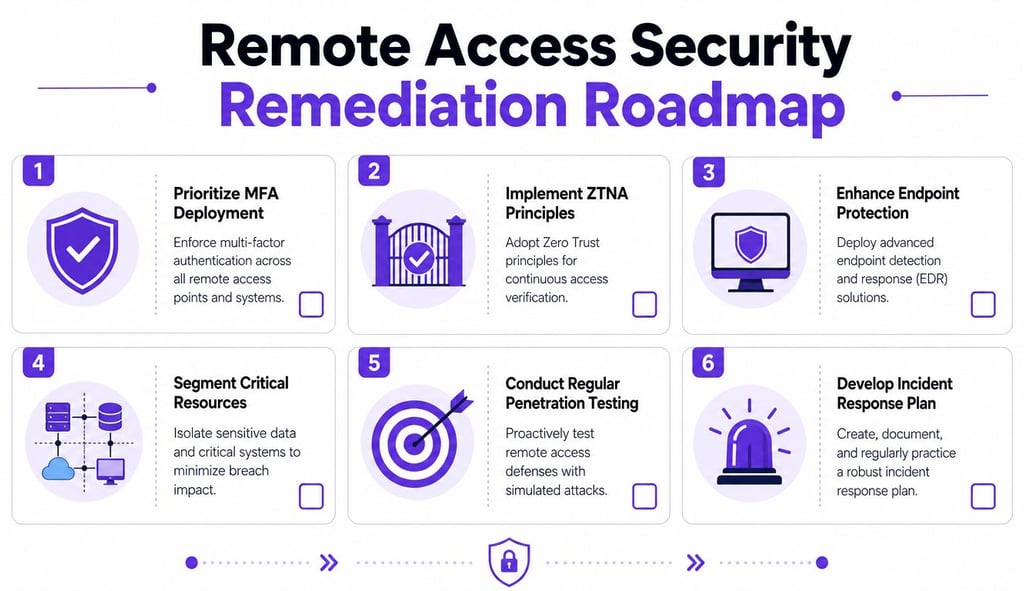
Pilot ZTNA for a high-risk group. Start with administrators, contractors, or teams handling sensitive data.
Require device posture for remote sessions. Unmanaged or unhealthy endpoints shouldn't reach business-critical resources.
Validate quarterly and after major change. Test remote access paths the way an attacker would, then verify the fixes.
Secure remote access by shrinking what each user, device, and session can touch. That one principle improves architecture, controls, monitoring, and response.
Null Cipher Security helps security leaders pressure-test remote access security the way real attackers do. Through Null Cipher Security, organizations can validate remote entry points, identity controls, cloud paths, and human workflows with adversary-simulated testing and executive-level remediation guidance.